Image History
Purpose, audience, prerequisites, and expected result
Image History is the runtime timeline attached to each standard image or sequence view. It lets you inspect retained step names, times, descriptions, pixel/sequence snapshots, and inherited lineage; restore an earlier or later retained state; clone a state into a new view; remove a non-initial state; and export a text record.
Use it when comparing processing branches or recovering from an unwanted operation. After the procedure below, you will know which state is active, have previewed another state without changing the target, and have either cloned, restored, or exported the intended state. Image History is not a project file, an unlimited undo journal, or a replacement for saving important images.
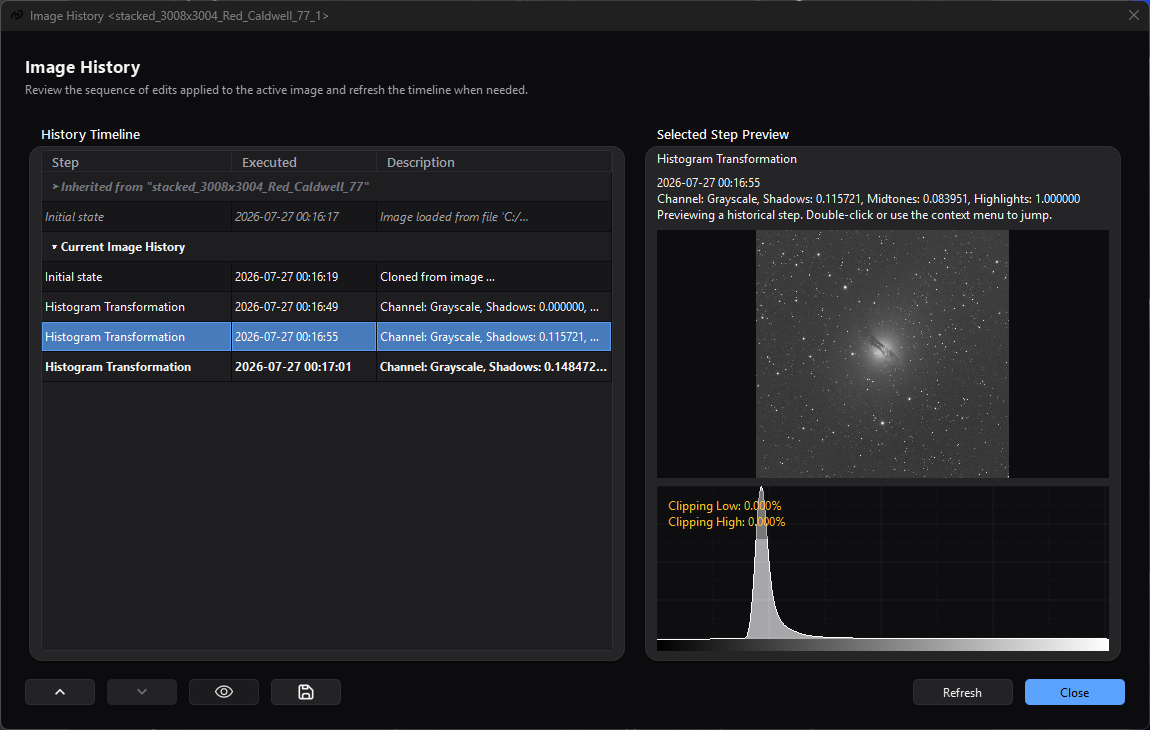
Selecting an older step previews that state without changing which later row is current; the inherited lineage remains separate above the current image's timeline.
Reachability and availability
| Item | Current behavior |
|---|---|
| Path | Edit > Image History; Image History in a standard image viewer toolbar; or viewer-focused Ctrl+Shift+Z. |
| Enabled/visible when | The Edit action requires an active standard view with an Image History tracker. Standard still and sequence viewers own a tracker; RT/static preview views do not. The viewer toolbar action exists in standard views. |
| Supported inputs/state | The retained initial state plus image-modification and rename steps recorded by processes/actions for one standard still or sequence view; optional inherited lineage copied when a new view is created from a parent view. |
| Outputs/side effects | Read-only preview/histogram; restoration of the source view to another retained state; a cloned standard view; immediate removal of a non-initial step; a text log; temporary backup files. |
| Persistence | Timeline, current index, lineage, and backup snapshots live only for the view/application lifetime. They are not embedded in saved images or sequences. A saved history log is descriptive text and cannot restore state. The last log-export folder is remembered. |
| External dependencies | None. Snapshot creation/restoration and log export require working temporary/output storage; sequence restoration also requires the referenced sequence file and its codec support. |
Before you start
- Save irreplaceable work before navigating or removing steps. Jump, earlier, later, Undo, and Redo replace the active image/sequence state. Remove Step has no confirmation and cannot be undone through Image History.
- Treat the 20 retained states as a rolling convenience buffer. Adding more steps promotes the oldest remaining modification to the new initial state and discards the previous oldest state.
- Check the current row (bold, with Current active step tooltip) before acting. Merely selecting a row previews it; double-clicking or choosing Jump To Step changes the source view.
- For branching, clone the desired state before running another process. A new step recorded after moving backward deletes the later redo branch.
- Ensure temporary storage remains available. A still snapshot is copied when its step is recorded and written in the background; an edit, a preview, a clone, or a restoration can wait in the background for a snapshot still being written, and an edit whose undo cannot be kept is refused.
Procedure
- Activate the target standard view and choose Edit > Image History, its
viewer toolbar action, or
Ctrl+Shift+Z. Confirm the title is Image History <view-name> and the bold row is the active state. - Select a different row once. Confirm the Selected Step Preview title does not include (Current) and the source image has not changed. When its snapshot loads, the scaled preview and histogram appear; otherwise the panel says Preview unavailable for this step.
- To preserve that state as a branch, right-click it and choose Clone From Step. Confirm a new standard view appears. The source remains on its current state, while the clone starts with a description naming the source view and selected step.
- To restore the source, double-click a non-current own-history row or use Jump To Step. Confirm that the row becomes bold/current and the source view becomes active. The adjacent-step arrow tooltips now name the available earlier and later states.
- If a later state should be recovered without creating a branch, use the later-step arrow or Redo. If you instead run a process from the restored state, understand that the prior later branch is removed when the new step is registered.
- Use the save icon or Save History Log... to write the complete inherited and current retained timeline. Confirm the file contains an inherited section when lineage exists and a current-history section. The lineage visibility toggle does not change what the log includes.
Complete control and action reference
| UI label/action | Type and unit | Default | Valid values/constraints | Effect | Enabled, hidden, or ignored rules | Trade-off or side effect | Scope | Persistence |
|---|---|---|---|---|---|---|---|---|
| Edit > Undo | Main-menu action; Ctrl+Z |
Disabled at initial state | Previous retained state | Restores the immediately earlier state; label becomes Undo <step> when named | Active standard view with an undo step | Replaces source pixels/sequence/name; a restore that fails changes nothing and reports the failure | Active view/current index | View lifetime |
| Edit > Redo | Main-menu action; Ctrl+Y |
Disabled at latest state | Next retained state | Restores the immediately later state; label becomes Redo <step> when named | Active standard view with a redo step | Replaces source state; a restore that fails changes nothing and reports the failure | Active view/current index | View lifetime |
| Edit > Image History | Main-menu action | Disabled without active tracker | Action | Opens a modeless Image History dialog for the active view | Active standard view with tracker | More than one dialog can be opened for the same view | Active view | Dialog not restored |
| Viewer Undo | Toolbar action | Disabled at initial state | Previous retained state | Same tracker operation as main Undo | Standard viewer with undo step | Current viewer receives the restored state | Owning view | View lifetime |
| Viewer Redo | Toolbar action | Disabled at latest state | Next retained state | Same tracker operation as main Redo | Standard viewer with redo step | Current viewer receives the restored state | Owning view | View lifetime |
| Viewer Image History | Toolbar action; viewer-focused Ctrl+Shift+Z |
Available in standard viewer | Action | Opens a modeless dialog parented to the view | Standard viewer; shortcut is handled by the focused image widget | Repeated activation can open multiple dialogs | Owning view | Dialog closes with parent view |
| History Timeline | Read-only, single-row table | Current row selected | Inherited headers/entries plus retained current-view steps | Displays lineage and own history in chronological retained order; not sortable | Lineage section depends on lineage toggle/data | A process decides the detail recorded in Step/Description; it may not include every parameter | One view | Runtime only |
| Step | Table column | Initial state plus recorded names | Text supplied by tracker/process | Identifies the operation; current row is bold | Inherited group headings span all columns | Names are descriptive, not executable presets | Timeline | Runtime only |
| Executed | Table column | Step creation time | Local yyyy-MM-dd hh:mm:ss |
Shows when the record was created | Empty on section/separator rows | Second precision; not a duration | Timeline/log | Runtime; copied to log |
| Description | Table column | Initial creation/open description or process text | Free-form recorded text | Shows available parameters/context | Empty values allowed | Coverage varies by process; not guaranteed to reproduce the operation | Timeline/log | Runtime; copied to log |
| Select own-history row | Single selection | Current row after refresh | Initial or retained modification/rename row | Loads its snapshot into preview/histogram without changing source state | Inherited/header rows are read-only and non-selectable | Loading can wait on backup I/O or sequence decode | Dialog preview | Selection resets to current on refill |
| Double-click own-history row | Table gesture | — | Non-current row with valid retained index | Calls Jump To Step | Current row is a no-op; inherited/header rows do nothing | Destructive source-state restoration | Source view | Updates current index |
| Selected Step Preview | Scaled image pane and status text | Current selected row | Snapshot available or unavailable | Shows step name/time/description/current status and an 8-bit display conversion of the selected still/frame | Hidden image content when restore fails or sequence has zero frames | Display is scaled and is not proof of exact pixel equality; quick zoom is disabled | Selected retained state | Not persisted |
| Selected-step histogram | Read-only histogram with clipping/area overlays | Visible when snapshot loads | Snapshot image; widget default resolution | Recomputes from the full-precision selected snapshot/current sequence frame | Hidden when preview unavailable; interactive zoom disabled | Histogram computation adds CPU/memory cost | Selected retained state | Not persisted |
| Earlier-step arrow (Jump to name) | Icon button | Disabled at initial state | Exactly current index minus one | Restores the adjacent earlier state; this is not row reordering | Enabled when an earlier state exists | Replaces source state and activates the view | Source view | Current index for view lifetime |
| Later-step arrow (Jump to name) | Icon button | Disabled at latest state | Exactly current index plus one | Restores adjacent later/redo state | Enabled when a later retained state exists | Replaces source state and activates the view | Source view | Current index for view lifetime |
| Show/hide inherited processing history from parent images | Checkable icon button | On | On or off | Shows/hides grouped inherited rows | Button itself is hidden when lineage is empty | Display only; hidden lineage is still included in saved log | Dialog table | Not saved; defaults on per dialog |
| Save the complete history log to a text file | Icon button | — | Save/cancel path | Writes lineage plus retained current history | Tracker required | Log can contain filenames/descriptions; it cannot restore snapshots | Current view history | Last folder under __IMAGE_HISTORY_SAVE__ |
| Refresh | Button | Enabled | Action | Rebuilds table, reselects current row, and reloads selected preview | Tracker/dialog alive | Usually redundant because tracker listeners refresh automatically; can trigger snapshot I/O | Current dialog | Not saved |
| Close | Default button | Enabled | Action/Enter when default | Closes this modeless dialog | Dialog open | Does not change or delete view history | Current dialog | Not saved |
| Jump To Step | Context action | Disabled for inherited/current/invalid row | Non-current own-history row | Restores selected state after a successful snapshot restore | canJumpToStep must pass |
Same destructive state change as double-click; later states remain available until a new step is registered | Source view | Updates current index |
| Clone From Step | Context action | Enabled for any own-history row with a step | Initial, current, earlier, or later retained step | Loads snapshot and creates a new standard still/sequence view | Inherited/header rows disabled; view factory and snapshot required | Uses memory/I/O; clone inherits source pending-change status and the source's complete retained lineage/history list | New view | New view history/lineage lasts for its lifetime |
| Remove Step | Context action | Disabled for initial state | Any non-initial retained own-history row while total >1 | Immediately erases selected state and releases orphan temporary backup | No confirmation; inherited/initial/invalid rows disabled | Irreversible. Removing current first restores its previous state; removing an older step shifts the index but keeps same snapshot; removing future leaves current state | Source timeline/view | Permanent for remaining view lifetime |
| Save History Log... | Context action | Enabled when total step count >0 | Save/cancel path | Same complete text export as save icon | Inherited/header context can still expose this action when tracker has steps, though those rows are not selectable | Includes lineage even when hidden; no automatic .txt suffix is appended by this code |
Current view history | Last folder remembered |
Behavior and state model
Each standard view creates a tracker and an Initial state. A modification step copies the still image the moment it is recorded, so later changes to the shown image cannot reach it, and the view's background writer saves the copy as a snapshot holding its pixels, its metadata and its mask of valid pixels. Across all open views, at most two copies, and 1 GiB between them, wait to be saved. An edit of the view - a mirror, a rotation, Apply Stretch - waits in the background until the state it replaces is saved and there is room for its own copy, and only then is shown; the window and the rest of the application keep responding meanwhile. If either cannot be kept, the edit is refused, an error says why, and the view keeps what it showed. A state a process has already shown is recorded at once. A Rename step shares its parent snapshot and records the new view name. A sequence step stores a reference to its sequence file when the edit wrote a new one. When the sequence file did not change - an edit of the frame on screen, such as Apply Stretch in a sequence view - the step writes that frame, with its frame number, before the edit is shown; if the frame cannot be written, the edit is refused and the view keeps the frame it showed before.
The current index divides earlier states from later redo states. Jump, Undo, Redo, and the arrow buttons restore a retained snapshot and update that index; they do not delete either side. Registering a new step while later states exist erases that redo branch and cleans up temporary backups no longer referenced.
At most 20 states, including the initial state, are retained. When another step would exceed the window, the oldest modification becomes the new initial state, the prior initial state is discarded, and orphan temporary data is released. This rollover is automatic and has no prompt.
Restoring a still reads its snapshot in the background into a new image that replaces the shown one when it has been read - the view keeps its file name - with the metadata and the mask of valid pixels the snapshot holds; the view then invalidates detected-star analysis, updates supported channels, and attempts to restore the recorded view name. The current row moves only once the restored state is shown, and one restore runs at a time: Undo pressed again before the first has landed does nothing. A snapshot that cannot be read changes nothing: the view, its name, and the current row stay as they were, and an error names the step. If another open view already uses that name, AfterNight generates a unique replacement and stores it back in the restored history step; later clones and propagated lineage use the replacement. Restoring a step of another sequence opens that sequence again and shows its frame; a step that kept a changed frame moves to that frame and shows the kept frame, and leaving such a step moves to the same frame and shows the sequence's own. History does not snapshot display channel/mode, zoom/pan, mask assignment/rendering, attached processes, pending-change flag, or the view's detected stars.
Selecting a step reads its snapshot in the background, only for inspection; a later selection replaces a preview still on its way. Still previews are shown as an 8-bit linear rendering at full scale - grey, colour, or colour with alpha, each with its own channels - while the histogram uses the restored full-precision image. A sequence step that kept a changed frame previews that frame. Any other sequence preview reads the selected sequence's frame at the source view's current zero-based frame index, with the source view's current auto-debayer setting. The preview is therefore contextual, not a saved record of the original display state.
Creating a view from another view copies the parent's existing lineage and then appends the parent's complete retained initial/modification list, grouped by recorded image name. These inherited rows are read-only. Clone From Step uses that same propagation, so its lineage includes the complete source retained list—not only steps through the selected row, and potentially including later redo states when cloning from an earlier position.
A still clone starts as an image that has never been a file, under the step's recorded name; the snapshot's metadata remains. A sequence clone shows the step's sequence at the frame the step changed, or at the source view's current frame, with the current auto-debayer choice. Both take the source's pending-change status; a clone carries no detected stars.
Inputs, outputs, and metadata
- History input is runtime state recorded by the owning view and processes. Step descriptions vary and are not guaranteed to include masks, every parameter, or enough data to recreate an operation.
- Restoring a still recovers its stored pixels bit for bit - every sample type, extreme values, infinities and subnormals included - with its metadata and its mask of valid pixels. It does not restore view-only display/mask/process state or detected stars.
- Sequence snapshots are file references, not independent copies, plus the kept frame of a step that changed only the frame on screen. Availability depends on that referenced sequence remaining valid until the tracker closes.
- Still snapshots and kept frames are written in a folder of the view's own,
AN_HISTORY_*in the temporary folder, each as a checksummed snapshot file holding the samples, every metadata object, the mask of valid pixels and the step's identity, written under a pending name beside it and renamed when complete. The history reads one back only as the step it wrote. A shown image's own file, temporary or not, is never read back as one, and its file name is not changed by the history. Closing the view drops snapshots still waiting to be written, stops the one being written, closes child history dialogs, and removes that folder and nothing else. A temporary sequence a process wrote stays until the application clears its temporary folder. - A still clone clears disk filename/size/time/format identity and the image filename so it starts as an unsaved derived view. A sequence clone remains tied to the loaded sequence representation.
- The history log contains inherited group headings and numbered entries, then
retained current-history entries with time, name, and description.
*marks the current modification row; when Initial state is current, the formatter does not add a current marker to that initial line. - The history log is plain text only. It stores no pixels, restorable backup paths, view state, or executable parameters.
Performance and responsiveness
An edit copies its result and waits for the background writer in the background: when two copies, or 1 GiB of them, are already waiting across all open views, the edit is shown only once the writer has saved one, so a burst of edits on a large image on slow storage takes longer to appear while the application keeps responding. A state a process has already shown is copied when it is recorded. Preview, clone, jump, removal of the active step and Undo/Redo read their snapshot, or decode their sequence frame, in the background and wait there for a snapshot still being written; closing the view stops the write in progress. Large images, long sequences and slow temporary storage therefore delay a preview or a restore rather than pausing the window.
Select only the state needed, avoid repeatedly refreshing large snapshots, keep fast temporary storage available, and save/close unnecessary views to release their retained backups. There is no history-operation progress dialog or cancel control.
Worked example
- Evidence mode: Source-and-test-derived.
- Starting state, actions, settings, checkpoints, result, and limitations: Begin with a disposable standard still containing Initial state plus two processing steps. Open Image History; current row is the last step. Select the first processing row once and inspect its preview/histogram without changing the source. Use Clone From Step and confirm a new view is requested from that snapshot. Back in the source, choose Jump To Step and confirm the selected row becomes current and the later arrow/Redo becomes available. Export the log before applying a different process; that new step would remove the old later branch. This establishes the source/test-defined transitions, not actual pixel fidelity, visual quality, disk capacity, timing, or platform rendering.
Warnings and limitations
- Image History is volatile and capped at 20 states. Saving an image or sequence does not embed it; closing the view releases its restorable snapshots.
- Remove Step is immediate and has no confirmation. The initial state cannot be removed, but any other retained step can.
- A new modification after moving backward discards the entire later redo branch.
- Selecting previews; double-clicking restores. Use a single click when the goal is inspection only.
- Preview is scaled/8-bit and uses current sequence frame/auto-debayer context. It does not restore or reproduce the original viewer display configuration.
- Lineage is descriptive and read-only. Current production propagation does not populate its optional source-file field and includes the source's complete retained list rather than truncating at a cloned historical row.
- A snapshot that cannot be written is reported, and its step cannot be restored: Undo, Redo, and Jump to it change nothing and say why. An edit of a sequence frame whose frame cannot be written is refused before it is shown; a change of the frame a process has already shown stays recorded and cannot be restored. There is no cancel control, and waits for a snapshot being written have no timeout; they happen in the background. Preserve work and inspect Session Console if a history action stalls.
- Jump, Remove, Undo, and Redo restore before they move the current row, so a failed restore leaves the view and the current row unchanged. While one restore is on its way, another history action and a new edit are refused.
- Rename-only steps share a snapshot. Restoring between them can change the view name without changing pixels.
- Restoring a recorded name that is already used by another open view assigns a unique replacement and updates that history step's stored name. Subsequent clones and lineage can therefore show the replacement rather than the originally recorded name.
- Saved logs may contain image names, descriptions, and source paths if lineage data supplied them. Review before sharing.
Troubleshooting
| Symptom or exact error | Verified cause/enablement path | Recovery | Evidence source |
|---|---|---|---|
| Edit > Image History is disabled | No active standard view/tracker | Activate a standard still or sequence view. RT/static previews do not own history | ActionStateCoordinator::updateActiveImageHistory; ImageViewControl::initialize |
| No selected image to show history from | Coordinator was invoked without an active view | Activate the intended standard view and reopen | ImageOperationsCoordinator::imageHistory |
| Preview says Preview unavailable for this step. | Snapshot is absent or could not be written, the snapshot could not be read, the sequence frame could not be read, or sequence has zero frames | Keep source open, verify temporary/sequence files and free space, inspect Session Console, then Refresh once | ImageHistoryControl::updateSelectedStepPreview; ImageHistoryTracker::stepReader |
| History Clone: Unable to clone the selected history step. | The step's snapshot or frame could not be read | Do not close source; verify temp/sequence availability and retry another retained step; inspect Session Console | ImageHistoryControl::cloneSelectedStep |
| Could NOT jump to the selected history step. Error message: ... | The step's snapshot or sequence frame could not be read, or the view could not show it | Preserve current view, inspect Session Console and storage, then try Clone From Step if its snapshot remains readable | ImageHistoryTracker::jumpToStep; ImageHistoryTracker::reportFailure |
| Could NOT remove the selected history step. Error message: ... | Restoring the previous state before removing the active row failed | Leave the row intact, inspect Session Console/storage, and save work before retrying | ImageHistoryTracker::removeStep; restore-before-erase contract tests |
| Could NOT undo the last step. Error message: ... or Could NOT redo the next step. Error message: ... | The snapshot of the step to restore could not be written or read; the view and the current row did not change | Keep the view open, check temporary storage and free space, and save the current state before continuing | ImageHistoryTracker::undoStep; ImageHistoryTracker::redoStep; test_image_history_safety.cpp |
| Could NOT keep the snapshot of step 'name' of 'view'; undo and redo cannot restore that step. Error message: ... | The background writer could not save the step's snapshot, usually for lack of temporary storage | Free temporary storage; save the current state if it matters, because that step cannot be restored | ImageHistoryBackupQueue.cpp; ImageHistoryTracker.cpp |
| Could NOT apply 'name', because ... Error message: ... | An edit of the view - a mirror, a rotation, Apply Stretch - was refused before anything changed: the state it replaces, its result or the sequence frame it changes could not be kept for undo, or a restore was still on its way | Nothing was applied; free temporary storage, wait for the restore, and apply again | ImageHistoryTracker::editPreparation; ImageHistoryTracker::registerEditBeforePublishing |
| Save History Log: Unable to write the history log file. | Selected path could not be opened writable | Choose a writable local destination and check permissions/free space | ImageHistoryControl::saveHistoryLog |
| Earlier/later arrow is disabled | Current index is already at that boundary | Select/preview any row, or use the available direction; arrows operate from current state, not selected row | previousStep; nextStep; updateNavigationButtons |
| A later branch disappeared | A new step was registered while current index was earlier than latest | It cannot be recovered from this tracker; use a saved clone/file. Clone before branching next time | ImageHistoryTracker::annotateNewStep |
| Oldest states disappeared | The rolling history exceeded 20 total retained states | Recover from a saved image/clone if available; history rollover is not reversible | ImageHistoryTracker::annotateNewStep; m_MaxSteps = 20 |
| Inherited rows are absent | View has no propagated lineage or the eye toggle is off | Use a view created from another standard view and enable the lineage toggle | ViewCreationCoordinator::propagateLineage; ImageHistoryControl::refillData |
| Restore changed pixels but not mask/display/zoom | Those are view-only states outside snapshot scope | Reapply the intended display mode, zoom, and mask configuration manually | ImageHistoryTracker::finishRestore; ImageViewControl::replaceImage |
Related workflow steps
- Image Viewer explains the owning standard view, viewer toolbar, display-only state, masks, and focused shortcuts.
- Process Windows explains when a successful Apply records a committed history step and which process state is not part of the snapshot.
- Toolbar & Menus documents the shared Edit actions and their active-view targeting.
- Saving & Exporting is the durable handoff after selecting or cloning the state you intend to keep.
- Session Console contains snapshot/restore diagnostics when a preview, clone, jump, remove, or save action fails.
References and provenance
- AfterNight view/history control, tracker, lineage, engine snapshot, metadata, application wiring, and focused tests are the authoritative implementation provenance for this page.
- No external algorithm or file-format standard is required for the history state model documented here.