Quick Start
Source and focused tests establish the labels, routes, state transitions, and branch behavior claimed below. The retained screenshots illustrate the documented ready and result states; they do not establish output quality or production performance.
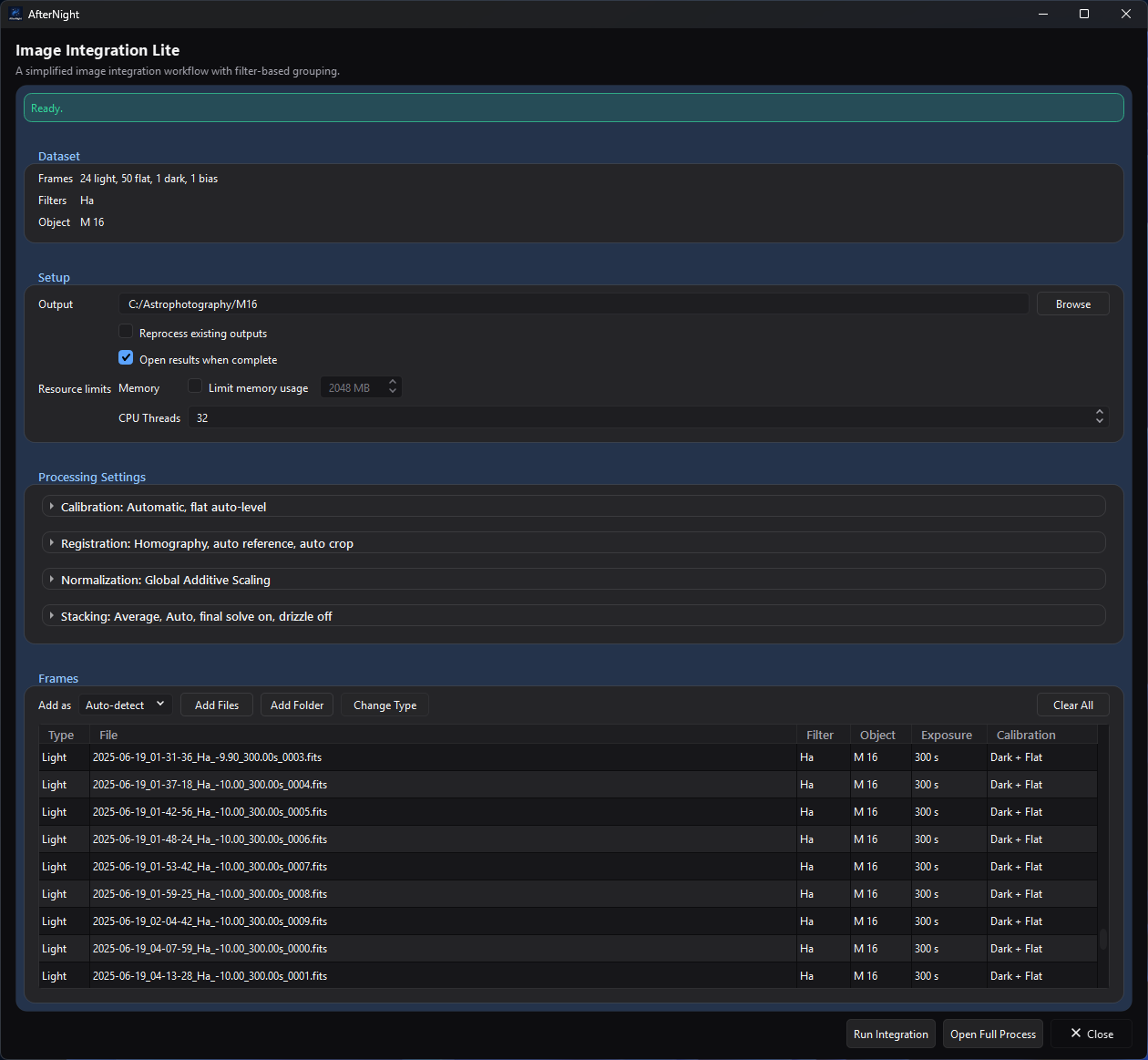
Image Integration Lite after import and validation. The green Ready. banner, dataset summary, planned calibration assignments, and Run Integration action show the state to reach before starting the workflow.
Purpose, audience, prerequisites, and expected result
Use this walkthrough to turn a small, consistent set of deep-sky acquisition frames into a first linear stacked master with Image Integration Lite. It is for a new user who wants a bounded first run before learning the full project workflow.
You need one target's still light frames, optional matching calibration frames, and a dedicated writable output directory. Use either the OSC/CFA branch or the mono branch below. At the end, AfterNight should report at least one generated master and write a workflow report under the output directory. Keep Open results when complete selected if you also want each successful light master opened in the workspace. This source-derived walkthrough does not promise a particular visual result.
Reachability and availability
| Item | Current behavior |
|---|---|
| Path | Process > Preprocess > Image Integration Lite. The Dashboard Image Integration card opens the full process, not Lite. |
| Enabled/visible when | The top-level Lite window is available without an active image. Run Integration is disabled while import is active or readiness has a blocking error. |
| Supported inputs/state | Engine-supported still images classified as Light, Flat, Dark, Dark Flat, or Bias. Use one target for this walkthrough. Sequences, videos, active-view masks, and multiple effective object names are outside Lite's first-run path. |
| Outputs/side effects | Calibration masters and intermediates as needed, one stacked FITS light master per integration group, workflow state, history, logs, and Markdown/HTML reports. Successful masters open only when Open results when complete was selected at run start. Source files are unchanged. |
| Persistence | The last valid output directory and Lite window size are restored. Imported frames and processing choices are window/run state rather than a saved Lite project. |
| External dependencies | Deployed codecs for the selected still formats. Plate solve final masters starts off in Lite and this walkthrough leaves it off, so no solver or catalog is required. |
Before you start
Keep all input files at stable paths and use a new or dedicated output directory with enough free space for intermediate and final files. Do not place unrelated supported images beneath a folder you plan to import recursively.
Choose one branch:
| Branch | Prepare | Check after import | Expected successful master |
|---|---|---|---|
| OSC/CFA | Original linear camera RAW or CFA FITS lights from one target and camera setup; matching dark/bias/flat frames when available. Do not debayer copies before this workflow. | Every acquisition row has the intended type and the effective Object is one value. The table has no size or filter-array column: lights of different sizes form separate integration groups, and a calibration frame whose size, channels, sample type, or filter array differs from its group's first readable frame is skipped and named during the run. Lite calibrates raw CFA samples before registration demosaics them. | A linear color light master for each effective integration group. Registration demosaics a light only when its file states a filter array, and its Auto pattern is the file's own, never guessed. If the colors look wrong, use Open Full Process and check Registration's CFA Pattern/Method: a stated pattern corrects a wrong arrangement, but it cannot turn a light whose file states no filter array into color; such lights are processed as monochrome. |
| Mono | Linear monochrome lights from one target and one filter for the first run; matching flats for that filter and matching dark/bias frames when available. | Filters shows the intended single label and rows have the correct type. Separate filters form separate integration groups, so add only one for this first pass. | One linear monochrome light master for the selected filter group. |
Calibration frames improve the scientific usefulness of the result, but a lights-only run is allowed with a warning. Do not interpret a structurally successful uncalibrated run as a calibrated result.
Procedure
- Start AfterNight and open Process > Preprocess > Image Integration Lite. Checkpoint: the window starts blocked with No light frames available. The last output directory used is restored when it still exists; otherwise Output directory is required. also blocks.
- Set Output with Browse to the dedicated directory. Existing matching artifacts can be reused, so prefer a new directory for a first run. Registration records written by a newer version stop the run with a Registration Records warning and are left unchanged.
- Leave Add as on Auto-detect when the files' headers, or the folders they sit in, name their frame type, then select Add Files. Use Add Folder only when that folder tree contains nothing unrelated. Checkpoint: the banner says frames are importing; controls are temporarily disabled; then the Frames, Filters, and Object summaries and table populate.
- Apply the branch checks above. Select any misclassified rows and use Change Type, or the row context menu's Set as action. Inspect each row's Calibration cell; its tooltip identifies the planned master files and uses.
- For this first pass, retain Automatic calibration matching, Homography, Auto-select reference, Global Additive Scaling, Average, Auto rejection, None weighting, and drizzle off. Leave Normalize master flat on and Optimize dark frames and Auto crop to common area off. Keep Open results when complete on. Leave Plate solve final masters off, as Lite opens it, so the run has no solver dependency.
- Read the readiness banner. Resolve every red error. A green Ready. banner, an amber Ready with n warning(s). banner, or the amber No calibration frames provided. Lights will be integrated without bias, dark, or flat calibration. banner enables Run Integration; open the warning tooltip and decide whether each warning is acceptable.
- Select Run Integration. Checkpoint: the banner changes to Preparing integration..., the run button disables, and the shared progress dialog appears. Keep the input paths and output directory available. Cancel requests cooperative cancellation; already completed group work can be retained and reported.
- On success, check for Integration complete. Generated n master image(s). With Open results when complete selected at run start, the successful masters open in the workspace. A cancelled run ends with Integration cancelled.; a failed one shows its error, or Integration failed. On failure or cancellation, preserve the output directory and read the reported error/log before retrying.
- In the output directory, locate
stacked_<integration-group>.fitand the latesthistory/<execution-id>/workflow_report.htmlorworkflow_report.md. Confirm that the report's input groups, calibration assignments, warnings, stage results, and output path match the intended branch. - Inspect the opened master at 100% zoom before continuing. If you cleared
Open results when complete, open the generated
stacked_*.fitfirst. A linear master often looks dark until display stretching is applied; display appearance is not proof of calibration or integration quality.
Complete control and action reference
| UI label/action | Type and unit | Default | Valid values/constraints | Effect | Enabled, hidden, or ignored rules | Trade-off or side effect | Scope | Persistence |
|---|---|---|---|---|---|---|---|---|
| Output / Browse | Directory field/action | Last valid remembered directory, otherwise empty | Existing or creatable writable directory | Sets every workflow output and history path | Disabled during import | Existing matching artifacts may be reused unless reprocessing is enabled | Whole run | Remembered for later Lite windows |
| Add as | Import classification selector | Auto-detect | Auto-detect, Light, Flat, Dark, Dark Flat, Bias | Classifies the next import; Auto-detect reads the frame-type header cards, then a folder on the path named for a frame type (flat(s), dark(s), bias(es)/offset(s), light(s)), and otherwise adds the frame as Light. File names are not read, as the item's tooltip says | Disabled during import | A forced wrong role produces bad grouping/matching | Next import | Window only |
| Add Files / Add Folder | File/directory actions | — | Supported still files; folder scan is recursive | Imports metadata asynchronously and ignores duplicate absolute paths in one batch | Disabled during import | Folder import can collect unrelated supported files | Model | Chooser location remembered |
| Change Type / Set as | Selected-row action | Imported role | One supported frame role | Reclassifies model records without modifying files | Requires selected rows; disabled during import | Rebuilds grouping/calibration plans | Selected rows | Window only |
| Processing settings used here | Selectors/check boxes | Automatic; Homography; auto reference on; Global Additive Scaling; Average; Auto rejection; no weighting; final plate solve off; drizzle off | See Image Integration Lite for the exhaustive ranges and interactions | Defines calibration, registration, normalization, stacking, and resources | Disabled during import; some rejection/drizzle fields depend on parent choices | Changes quality, runtime, memory, disk use, or external requirements | Whole run/groups | Window/run only |
| Plate solve final masters | Check box | Off | On/off | Attempts final WCS solving when needed | Solver used only when on and valid WCS cannot be propagated | This walkthrough leaves it off to avoid an external solver dependency | Final masters | Window/run only |
| Open results when complete | Check box | On | On/off | Opens each successfully generated light master after a successful run | Disabled during import; snapshotted when execution starts | Does not change generated files or reports; when off, open stacked_*.fit manually |
Completion behavior | Window/run only |
| Run Integration | Primary action | Disabled | Requires import idle and no validation errors | Snapshots the model, reapplies Lite policy, builds the manifest, and runs asynchronously | Enabled for Ready or Ready-with-warning states | Writes files and can use substantial CPU, memory, and disk | Whole run | Artifacts/history persist |
| Cancel | Progress action | — | Cooperative request | Stops future work when the executing stage observes cancellation | Visible during execution | Completed group outputs/report history can remain | Active run | Not persisted |
| Open Full Process | Handoff action | — | Current Lite model | Copies the current setup into full Image Integration | Available outside blocked import operations | Use for manual assignments, CFA overrides, multiple targets, or advanced diagnostics | Current model | Full process can then save a project |
Behavior and state model
flowchart TB
    accTitle: Image Integration Lite state model
    accDescr: The Lite workflow moves from import and review through readiness, execution, and a successful or interrupted result.
    Empty[Empty or blocked] -->|Set output<br/>and import| Imported[Frames imported]
    Imported --> Review[Review roles/groups<br/>and calibration]
    Review --> Ready{Ready?}
    Ready -->|No| Review
    Ready -->|Ready/warning| Running
    Running -->|Success| Masters[History/report<br/>Optional masters]
    Running -->|Fail/cancel| Evidence[Errors/logs<br/>Completed artifacts]
Lite derives grouping and calibration matching from metadata, then applies a fixed beginner-oriented policy before building the same manifest used by full Image Integration. OSC/CFA calibration occurs before demosaic; registration loads and demosaics CFA data for star matching/alignment. Mono data remains single-channel, and different effective filter labels produce different light integration groups.
Readiness is structural. A Ready banner means the model has no blocking validation error; it does not prove good calibration matches, registration, focus, sampling, or output quality. Execution is asynchronous, and its immutable manifest separates the running workflow from later UI edits.
Inputs, outputs, and metadata
Lite's import reads each supported still file's type, dimensions, exposure, temperature, ISO/gain, offset, filter, object, capture time, and readout mode without rewriting the source; the filter array and WCS are read from the files when registration runs. Automatic classification falls back to Light; always verify the table.
Generated products include master_bias_<group>.fit,
master_dark_<group>.fit, and master_flat_<group>.fit when those masters must
be built; registered/normalization intermediates; and
stacked_<integration-group>.fit for each successful light group. A stable
short hash is added if an output name would collide. Workflow state lives under
.afternight/image_integration/, while each archived run can contain its
manifest, log, Markdown/HTML report, group summaries, and retained outputs below
history/<execution-id>/.
Performance and responsiveness
Import and execution run asynchronously, but integration can still consume substantial CPU, memory, and storage. A smaller representative set, one target, one filter/group, drizzle off, and a dedicated output directory make the first run easier to inspect. Limit memory usage selects tiled stacking; it does not cap every codec, registration, or reporting allocation. Do not infer production timing or peak memory from this source-derived walkthrough.
Worked example
- Evidence mode: Source-and-test-derived.
- Starting state, actions, settings, checkpoints, result, and limitations:
| Stage | OSC/CFA branch | Mono branch | Shared checkpoint |
|---|---|---|---|
| Input | One target's original linear CFA lights plus matching calibration frames when available | One target's linear lights from one filter plus matching calibration frames when available | Imported row count and roles match the selected files; Object is a single effective value |
| Branch check | CFA metadata is consistent; uncertain CFA interpretation is handed to the full process | Filters shows the intended single filter | Calibration cells identify the intended automatic assignments |
| Settings | Beginner settings from step 5; final plate solving off | Same | Ready or Ready-with-warning banner; Run Integration enabled |
| Execution | Raw-sample calibration precedes CFA demosaic and registration | Mono frames register and stack within the filter group | Preparing banner and progress dialog appear; source paths remain stable |
| Result | At least one successful linear light master for the effective OSC group | One successful linear light master for the selected mono filter group | Completion banner reports generated master count; output opens when Open results when complete was selected; history report names inputs, warnings, stages, and output |
The walkthrough and branch behavior are source-and-test-derived. The retained result capture demonstrates that Lite can open a generated master, but does not validate either branch's output quality or performance.
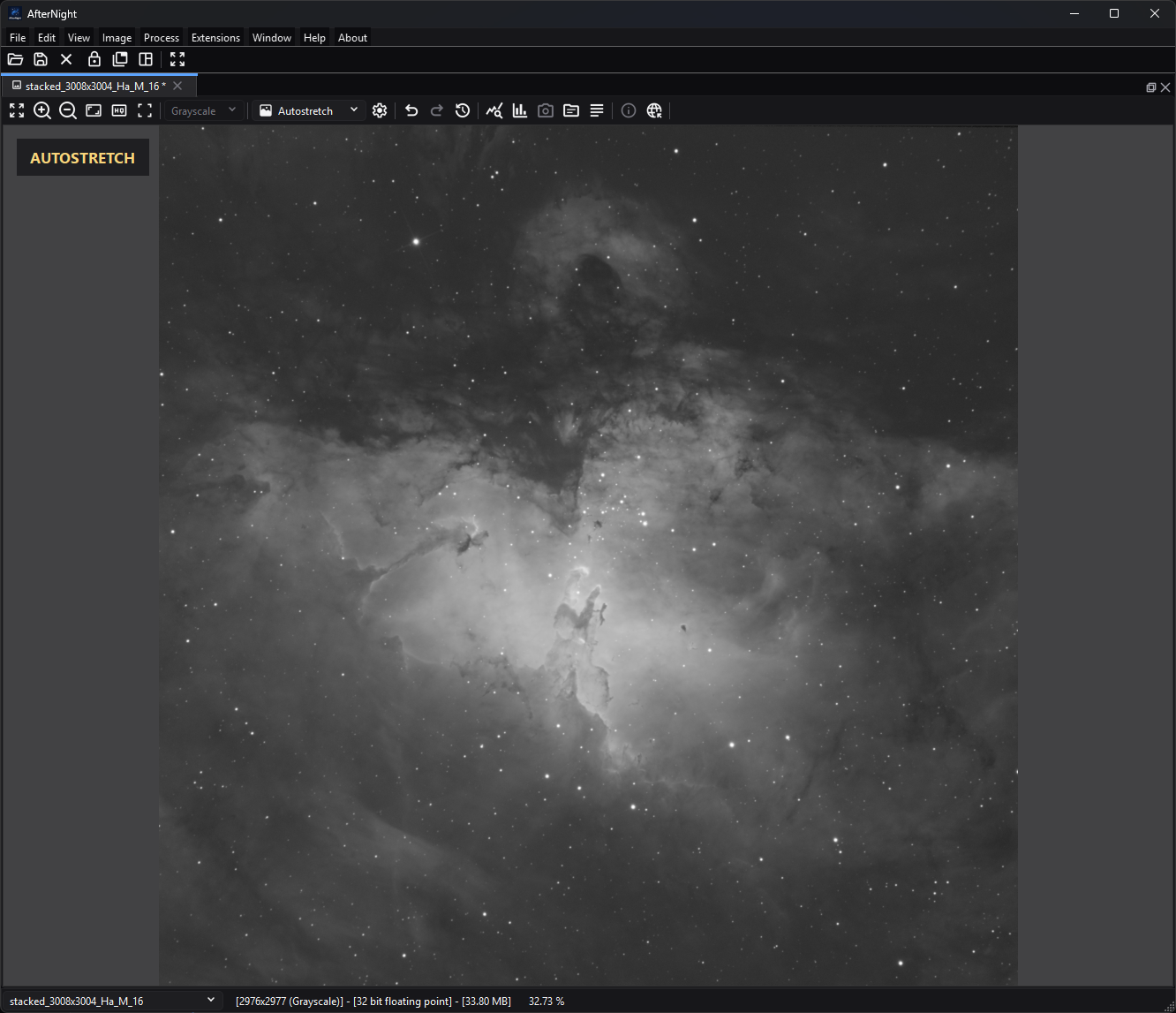
A successful Lite run can open its generated linear master in the workspace. This capture uses Autostretch for display only; it does not alter the linear image data or demonstrate a quality threshold.
Warnings and limitations
- Lite accepts one effective object. Multiple nonblank object names are a blocking error; use full Image Integration for multi-target work.
- Auto-detect and a Ready banner are not substitutes for checking frame roles, filter/object metadata, CFA interpretation, and calibration matches.
- A lights-only run is allowed but warned as uncalibrated. Flats without Bias or Dark Flat calibration also warn.
- Source files are preserved, but output/history files consume storage and new runs can reuse or replace current matching artifacts while archiving prior state.
- Sequence/video input, masks, comet tracking, manual calibration assignment, per-group advanced settings, and persistent Lite projects are unsupported.
- Do not judge a linear integration solely from its unstretched display.
Troubleshooting
| Symptom or exact error | Verified cause/enablement path | Recovery | Evidence source |
|---|---|---|---|
| Run Integration remains disabled | Import is active, or readiness reports a missing, non-directory, unwritable, or uncreatable output directory, No light frames available., or multiple objects; the banner shows up to three errors | Wait for import; read the red banner; correct roles, paths, or object metadata | ImageIntegrationLiteProcess.cpp; test_image_integration_lite_process.cpp; test_lite_integration_profile.cpp |
| An import adds no rows | No selected/scanned file passed the still-image extension/import checks. The import's own message is replaced at once by the readiness banner, so into an empty list it shows No light frames available. | Use a readable still format from File Formats, or extract sequence frames first | ImageIntegrationLiteProcess.cpp; FileImport.cpp |
| The run fails with Invalid workflow manifest. | Size or format problems among the frames are found only when the run prepares | Read the warning it shows, remove or correct the named frames, and run again | WorkflowExecutionController.cpp; IntegrationDataModel.cpp |
| No calibration frames warning | Lights exist but no calibration frames are loaded | Add matching frames, accept an explicitly uncalibrated structural run, or stop | ImageIntegrationLiteProcess.cpp; focused UI readiness tests |
| Missing flat calibration match warning | Flat metadata/filter does not match the Light group under the active policy, or bias/dark frames are loaded with no flats at all | Correct frame roles/metadata choice, use matching flats, or hand off to the full process | CalibrationMatcher.cpp; test_image_integration_lite_process.cpp |
| CFA color/pattern looks wrong | The filter array the files state is wrong for the camera, or the files state none and are processed as monochrome | Stop judging the result; use Open Full Process and set Registration's CFA Pattern/Method explicitly. A stated pattern corrects a wrong arrangement; it cannot make a light whose file states no filter array into color | RegistrationFrames.cpp; DemosaicTextMaps.h; full Image Integration registration controls |
| Integration failed or was cancelled | A workflow stage returned an error or observed cancellation | Preserve the output directory and read the banner/log. If at least one integration group completed, also inspect its retained outputs and archived report; an earlier failure or cancellation may not create an archive. Correct the cause and rerun. | WorkflowExecutor.cpp; WorkflowArchiver.cpp |
| Existing result was reused unexpectedly | Matching artifacts exist and Reprocess existing outputs is off | Enable reprocessing or choose a fresh output directory | ImageIntegrationLiteProcess.cpp; WorkflowExecutor.cpp |
| Registration Records warning and the run does not start | The directory's registration_metrics.db was written by a newer AfterNight version |
Use that newer version, or choose a fresh output directory; the records are left unchanged | ImageIntegrationProcessShared.cpp |
Related workflow steps
Start with First Launch if the application and file-opening path are not yet verified. Use Image Integration Lite for the exhaustive control/policy reference, or hand the model to full Image Integration for manual grouping, assignments, diagnostics, projects, and advanced outputs.
After a successful stack, use the Image Viewer to inspect it and distinguish its temporary Autostretch from a pixel-changing process such as Statistical Stretch. Choose a save/export path through Supported Formats, whose detailed capability authority is File Formats.
References and provenance
- The implementation and focused tests are the primary sources for this source-derived walkthrough.
- Image Integration Lite retains the exhaustive Lite policy, parameter, output, and limitation record.
- Image Integration retains the shared workflow, engine, report, and advanced-process record.
- No external algorithm or format contract is introduced here; detailed format provenance is centralized in File Formats.