Astrometry Overlays
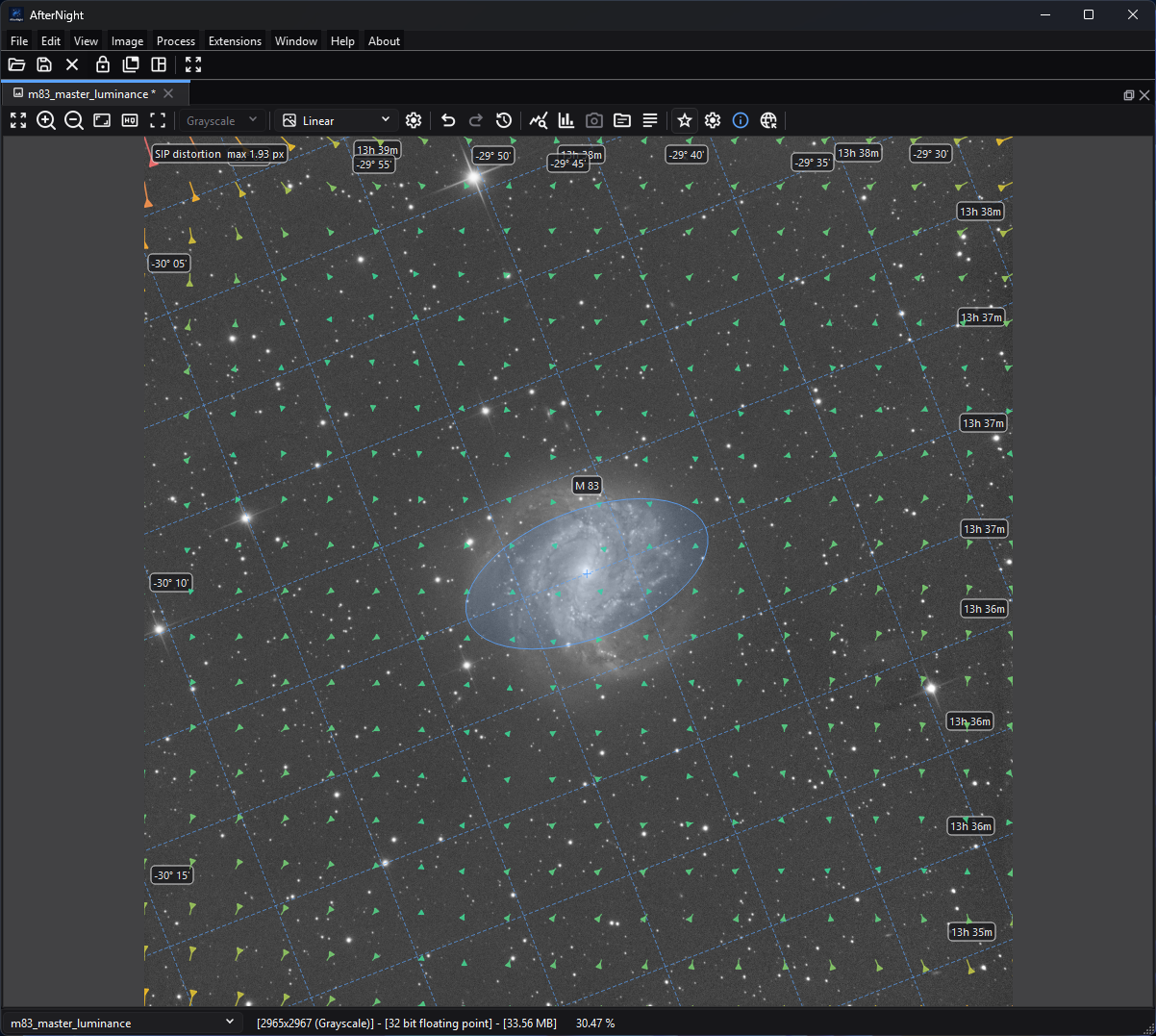
The overlays share the viewer without changing image pixels: the grid provides coordinates, the ellipse identifies M83, and the vector field visualizes the SIP correction.
Purpose, audience, prerequisites, and expected result
Astrometry overlays place sky coordinates, catalog objects, bright-star names, detected-star shapes, and optical-distortion vectors over a still image without changing its pixels. They are intended for checking a plate solution, orienting the field, identifying objects, and diagnosing whether a SIP distortion model looks plausible.
The image must contain a celestial World Coordinate System (WCS) that AfterNight can parse. A successful Plate Solve can write one into the current image metadata. Once WCS is available, the Show Astrometry and Astrometry Settings actions appear in that image view. Enabling the master switch draws only the layers currently selected in the settings popup.
Reachability and availability
| Item | Current behavior |
|---|---|
| Path | Open a solved still image, then use Show Astrometry and Astrometry Settings in that image view's toolbar. If no WCS is present, use the adjacent Plate Solve action or Image > Plate Solve first. |
| Enabled/visible when | Show Astrometry and Astrometry Settings are visible only for a non-sequence image with a parsable celestial WCS. Settings is enabled only while the master switch is on. Astrometry Info remains visible for a still image but is disabled without WCS. Focused-view shortcuts honor the same visible/enabled gates. |
| Supported inputs/state | A standard still-image view whose in-memory metadata contains a valid celestial WCS. Pixel type, channel count, linear/nonlinear state, display channel, autostretch, masks, and zoom do not alter the stored solution. Sequence views do not expose these overlays. |
| Outputs/side effects | Display-only painter layers in the current image view. Overlay changes do not edit pixels, metadata, image history, masks, or files. Plate Solve and Clear Astrometry are separate metadata-changing actions. |
| Persistence | The master switch starts off in each newly created image view and is not saved. Grid, deep-sky annotations, bright-star labels, detected stars, SIP map, and magnitude limit are written immediately to global settings for later image views. Other already-open views keep their own current action state. |
| External dependencies | Grid, deep-sky annotations, and bright-star labels work offline from WCS plus bundled catalogs. The SIP map needs forward A/B SIP coefficients. Detected-star markers need the stars the view detected after an in-app solve, or copied with a duplicated view; no catalog is used for them. A solver/catalog/network may be needed only to create the WCS in the first place. |
Before you start
- Confirm that Astrometry Info reports a solution. Merely having a FITS
header is not enough; the header must contain a celestial WCS the engine
reads: a tangent-plane projection (
RA---TAN/DEC--TAN, optionally with the-SIPsuffix) in degrees, in the ICRS or at the J2000 equinox with no frame. Another projection, axis order or frame is refused and shows no solution. - For newly solved images, keep Write WCS to the current image metadata on if the solution should remain available to the current view. Save to an appropriate metadata-capable format if it must survive closing the image.
- A normal WCS is sufficient for the grid and both bundled catalog layers. The
SIP map remains empty unless
CRPIX1/2, a valid order from 2 through 6, and forwardAorBcoefficients are present. - The managed Gaia catalog under Settings > Catalogs & Data is used by the internal solver. It is not the source for Deep-Sky Annotations, Star Labels or Detected Stars: the detected stars are not matched against it.
- Start with the default grid alone. Add one dense layer at a time so labels and markers remain interpretable.
Procedure
- Open a still image and click inside its image view. If Show Astrometry is absent, run Plate Solve or reopen an image whose metadata contains a valid celestial WCS.
- Select Show Astrometry or press
Ctrl+Shift+W. The default configuration draws the equatorial grid only. - Select Astrometry Settings. Enable Deep-Sky Annotations, Star Labels, Detected Stars, or SIP Distortion Map as needed. A checked layer is still gated by the master switch and its own data prerequisite.
- Set Magnitude Limit. Smaller limiting magnitudes retain only brighter catalog entries; larger values can make wide fields crowded and slower to redraw. The limit does not affect the grid, detected stars, or SIP vectors.
- Pan or zoom to the region of interest. Grid spacing and visible catalog queries are recomputed for the viewport. Check object outlines and names against image structure, but treat them as WCS/catalog projections rather than proof that the plate solution is correct.
- Turn individual layers off to isolate a discrepancy. Turn Show Astrometry off when processing or judging the underlying pixels; the selected sub-layer preferences remain saved.
Complete control and action reference
| UI label/action | Type and unit | Default | Valid values/constraints | Effect | Enabled, hidden, or ignored rules | Trade-off or side effect | Scope | Persistence |
|---|---|---|---|---|---|---|---|---|
Show Astrometry (Ctrl+Shift+W) |
Checkable toolbar action | Off | Off/On | Master-enables every checked overlay layer. Turning it off hides all astrometry painters without changing their selections. | Visible and enabled only for a solved still image. It does not create a solution. | Several active layers can obscure the image and add redraw work. | Current standard image view, display only | View lifetime only; every new view starts off. |
| Astrometry Settings | Toolbar popup action | Disabled until the master is on | Click action | Opens the layer and magnitude menu. | Visible only for a solved still; enabled only while Show Astrometry is on. Focused-view shortcuts can toggle individual settings without opening the popup. | No image change. | Current view controls | Popup state is transient; sub-options persist as described below. |
Equatorial Grid (Ctrl+1) |
Checkable layer | On | Off/On | Draws projected right-ascension and declination lines with sexagesimal labels. | Drawn only when WCS parses and the master plus this option are on. | Dense fine-field grids add projection and label work. | Current viewport | Global key platesolve/coordinateGridEnabled; immediate write. |
Deep-Sky Annotations (Ctrl+2) |
Checkable layer | Off | Off/On | Queries the bundled NGC/IC catalog plus Messier and Caldwell entries, projects object centers/outlines, and labels compact catalog IDs. | Requires WCS and the bundled object catalog; gated by the master. | Wide fields and faint limits increase markers and label overlap. Catalog sizes/position angles include project-curated approximations, and the Caldwell rows have the provenance limitation recorded below. | Current viewport | Global key platesolve/catalogAnnotationsEnabled; immediate write. |
Star Labels (Ctrl+3) |
Checkable layer | Off | Off/On | Projects entries from the bundled bright-star catalog and labels common name, then Bayer/Flamsteed-style designation, then catalog ID as available. | Requires WCS and the bundled HYG-derived catalog; gated by the master. This is not a label switch for detected-star ellipses. | Labels can overlap in rich fields. Bundled coordinates are J2000 ICRS and this display path does not apply proper-motion correction. | Current viewport | Global key platesolve/starLabelsEnabled; immediate write. |
Detected Stars (Ctrl+4) |
Checkable layer | Off | Off/On | Draws fitted ellipses around the stars the view detected; saturated detections use the error color. | Requires the view's detected stars as well as the master. The normal population path runs asynchronously after Plate Solve writes WCS; simply opening an already-solved file does not start this detection pass. | Up to 5,000 markers may be painted. These are image detections, not the bundled bright-star labels. | Current image/detected stars | Global key platesolve/detectedStarsEnabled; immediate write. The detected stars themselves are in-memory view state, not this preference. |
SIP Distortion Map (Ctrl+5) |
Checkable layer | Off | Off/On | Draws sampled forward SIP displacement arrows and a legend containing the largest actual displacement in pixels. | Requires a valid forward SIP model (A_ORDER/B_ORDER and coefficients); inverse-only AP/BP data is insufficient. Gated by the master. |
Arrow lengths are display-scaled for legibility and are not a literal screen-length measurement; use the legend for the actual maximum. | Whole image model, filtered to current viewport | Global key platesolve/distortionMapEnabled; immediate write. |
| Magnitude Limit | Exclusive choice, apparent magnitude | Mag <= 12 |
Mag <= 6, 8, 10, 12, 14, 16, or All Catalog Objects (99) |
Sets the upper numeric magnitude accepted by both bundled catalog queries; a smaller number shows brighter entries. | Does not filter detected stars, grid lines, or SIP vectors. Named deep-sky entries whose catalog magnitude is unknown remain eligible. The bundled bright-star file itself stops at visual magnitude 6.5, so choices of 8 and fainter do not add more bright-star rows. | Larger limits mainly increase deep-sky density, redraw cost, and label overlap. | Current view's two bundled catalog layers | Global key platesolve/catalogMagnitudeLimit; immediate write for later views. |
Astrometry Info (Ctrl+Shift+P) |
Toolbar action | Visible, disabled when unsolved | Click action | Opens the solution summary for the current image. | Still images only; enabled when WCS parses. | Inspection only. | Current image metadata | No overlay preference change. See FITS Header, EXIF, And Astrometry Metadata. |
Plate Solve (Ctrl+P) |
Toolbar action | Visible for a still image | Click action | Opens the solver workflow that can write WCS/SIP metadata and then launch post-solve star detection. | Hidden for sequences and requires a current image. The dialog still opens when no solver is configured; its Solve button remains disabled until a supported backend and required catalog/path are configured. | Solving can use CPU, disk catalogs, an external program, or network upload depending on backend. | Current still image | Solver settings persist separately; written metadata marks the image pending. |
Behavior and state model
Master and per-view state
Each standard image view owns its overlay painters and action state. The master switch gates every painter and deliberately starts off for a new view. Changing a sub-layer or magnitude writes its global preference immediately, but it also changes only the view where the action was triggered. A later-created view loads the saved choices; another view that is already open is not synchronized.
If WCS is added or removed, the image view reparses the metadata, updates action visibility, and invalidates the relevant caches. Clear Astrometry also clears the detected stars, as does any later edit of the image or a new image shown in the view. Overlay preference changes alone never mark the image as modified.
Equatorial coordinate grid
AfterNight samples the visible viewport in pixel coordinates, converts the edge samples through the WCS, and chooses a grid interval from the larger visible RA or Dec span:
| Visible span | Grid interval |
|---|---|
| More than 10 degrees | 2 degrees |
| More than 2 degrees | 30 arcminutes |
| More than 30 arcminutes | 5 arcminutes |
| More than 5 arcminutes | 1 arcminute |
| 5 arcminutes or less | 10 arcseconds |
Each RA or Dec line is sampled into a projected polyline. RA is normalized
across 0/360 degrees; Dec is constrained to -90 through +90 degrees. Labels use
hours/minutes for RA and signed degrees/arcminutes for Dec, adding seconds at
the finer intervals. A label is rounded once and the rounding carries into every
field: a right ascension of 10h 29m 59.996s is labelled 10:30:00.00 or
10h 30m 00.00s, never with sixty seconds under the same minute. Invalid
projected segments are skipped rather than joined across the view.
Bundled catalog annotations and labels
Both catalog layers read their bundled catalog on a worker the first time they are drawn and ask it, on the worker, for the entries inside the whole image's field and a margin - two degrees for deep-sky objects, one for bright stars - at the magnitude limit. Each paint projects the last answer through the WCS, so the labels appear on the paint after the answer lands, and panning or zooming projects them again without asking.
- Deep-Sky Annotations use the bundled NGC 2000.0-derived NGC/IC rows, Messier aliases, 109 project-maintained Caldwell rows, and curated common names/extents. An object with known size is drawn as a projected ellipse using its major/minor axes and position angle; an object without extent is drawn as a small point outline. Labels use the compact catalog ID. Coincident aliases are collapsed, and annotations projected within 12 screen pixels are de-duplicated. The current generator recreates the NGC/IC and Messier portion but not the directly maintained Caldwell rows.
- Star Labels use the bundled HYG 4.2 subset filtered at generation time to visual magnitude 6.5 or brighter. The marker is a cross and dot. Label preference is common name, designation, then ID.
For catalog magnitude, lower numeric values are brighter. Deep-sky entries with an unknown magnitude but a curated common name bypass the numeric cutoff so important named objects are not silently lost. Catalog projection confirms where the current WCS places an entry; it does not validate that the visible feature is truly that object.
Detected-star markers
After Plate Solve writes WCS, AfterNight launches star detection on a worker. Mono images use channel 0. Multi-channel images try green first and try red when the first pass finds fewer than 25 stars that the solution places on the sky. The fixed overlay detection setup uses a five-pixel search radius, noise sigma 1.0, roundness 0.4, Gaussian PSF fits, and a 5,000-star cap. A mosaic (undemosaiced filter-array image) is not detected and draws no markers. The completed detection is shown only if the view still shows the image it read and no newer detection was asked for; a failure is logged and leaves no markers.
Marker centers, axes, and angles come from those fitted image stars; the stars are not matched against a catalog. Opening a pre-solved image does not currently trigger this post-solve detection path, so Detected Stars may remain empty while the other WCS layers work.
SIP distortion vectors
For image pixel (x, y), measured so that the first pixel's center is at
(0.5, 0.5), AfterNight forms coordinates relative to the SIP reference pixel.
The header's CRPIX1/CRPIX2 count from one at the first pixel's center, so the
card reader restates the reference pixel once, half a pixel lower, in the same
convention as (x, y):
and evaluates the forward polynomials:
The map samples this displacement on a fixed 20 by 20 grid of pixel centers,
from the first pixel's to the last's. Arrow direction
shows (x'-x, y'-y) and color progresses from the theme's success color toward
warning/error as magnitude approaches the largest sampled displacement. The
legend reports that largest magnitude in source-image pixels. To keep tiny or
large distortions readable, displayed arrow length is normalized toward 12%
of the shorter viewport dimension, clamped to a 24-96 pixel target and a
0.75-40 scale factor. Therefore compare direction, relative color, and the
legend—not the raw on-screen arrow length.
Inputs, outputs, and metadata
- Input is the current still image plus its in-memory FITS-style metadata, read once into one solution: the projection, the reference, the matrix and the SIP polynomials every layer draws through. A header that states the J2000 equinox and no reference frame is read in the ICRS; one that states FK5, or another equinox and no frame, shows no solution and no overlay.
- Every layer draws a position at the center of the pixel it names: an image
position is measured with the first pixel's center at
(0.5, 0.5)and drawn at that position times the zoom. - Overlay painters operate on the current zoomed widget. They do not resample, recolor, clip, stretch, mask, or otherwise modify the source image.
- No overlay action creates a new view, file, history step, metadata card, or auxiliary map. The SIP map is a visualization, not an exported distortion image.
- Plate Solve can write WCS metadata as a step of the image's history and mark the image pending. Clear Astrometry removes the WCS/SIP cards and solver tag as another history step, clears the detected-star profile, and also marks the image pending. Follow Saving And Exporting to preserve and verify metadata.
- Duplicating an image can copy the view's detected stars and metadata; overlay master state remains a property of each view.
Performance and responsiveness
- Grid, catalog, and label geometry is cached by metadata identity, zoom, scroll offsets, viewport/widget size, and magnitude where applicable. Panning, zooming, resizing, renaming, changing magnitude, or updating the image invalidates some or all cached display work.
- Each catalog layer reads its bundled catalog on a worker the first time it is drawn, and keeps it while the view lives; drawing never waits for it. The catalog is queried on a worker once per solution and magnitude limit, and requires no network.
- A paint projects only the entries the last query answered. Use a brighter magnitude limit or disable one label layer if a wide field becomes cluttered.
- The detected-star pass is asynchronous, but drawing can still iterate up to 5,000 ellipses on each repaint. Disable Detected Stars when it is not the layer being inspected.
- SIP polynomial samples are cached as 400 vectors for the image dimensions and metadata; each repaint filters them to the visible viewport. This layer does not perform a full-image warp.
- Overlay controls do not use the GPU directly and do not block on a network request. Plate solving and managed catalog operations have separate costs.
Worked example
- Evidence mode: Source-and-test-derived.
- Starting state, actions, settings, checkpoints, result, and limitations: The
focused tests construct a 1000 by 800 synthetic TAN WCS centered on M 31,
verify that the bundled catalog finds M 31, and verify that its catalog center
projects to pixel
(499.5, 399.5): the header's one-based reference pixelCRPIX = (500, 400)restated with the first pixel's center at(0.5, 0.5). Separate synthetic SIP metadata is sampled on a 5 by 4 grid; all 20 sampled displacements match direct forward-polynomial evaluation. Grid tests cover adaptive spacing, RA wrap, high declination, and label formats. This verifies projection/filter mechanics only. It does not claim that a GUI rendering was inspected, that a real sky image was solved, that annotations align visually with project-owned data, or that a particular frame rate was achieved.
Warnings and limitations
- An overlay can be internally consistent with an incorrect WCS. Confirm scale, rotation, field center, and several known objects before trusting it.
- The master switch is intentionally not persisted. Seeing saved sub-layer checks does not mean overlays will start enabled in a new view.
- Detected Stars can be empty on a valid pre-solved file because automatic overlay detection is currently invoked after an in-app solve, not on every file load.
- Bright-star labels use a static J2000 ICRS HYG subset with no display-time proper-motion correction. High-proper-motion stars and observations far from J2000 can show a small catalog-position offset.
- The deep-sky catalog contains derived or curated extents and position angles; outlines are orientation aids, not precision isophotes or scientific region boundaries.
- The repository records the Caldwell rows as direct project additions but does not record their original upstream dataset or license, and the current deep-sky generator does not recreate them. Treat their positions, magnitudes, extents, and names as project-maintained orientation data rather than a reproducible scientific catalog source.
- The magnitude choice is shared by both bundled catalog layers, but the bright-star source contains nothing fainter than magnitude 6.5. Fainter menu choices mostly affect deep-sky annotations.
- SIP arrows are deliberately rescaled. Only the legend is an actual maximum displacement measurement in source-image pixels.
- Overlays are not supported in sequence views, real-time preview views, or static embedded previews.
Troubleshooting
| Symptom or exact error | Verified cause/enablement path | Recovery | Evidence source |
|---|---|---|---|
| Show Astrometry is absent | The active view is a sequence, has no image, or its metadata does not parse as celestial WCS (for example a non-TAN projection, or a header that states FK5). |
Activate a still image; inspect Astrometry Info/FITS headers; run Plate Solve and write WCS. | ImageViewControl::updateImageActions; readImageWcsSolution; parseWcsCards |
| Astrometry Settings is visible but disabled | The WCS is valid, but the master switch is off. | Turn on Show Astrometry or press Ctrl+Shift+W. |
Image-view action wiring |
| Grid appears but no catalog objects | The relevant catalog layer is off, the magnitude limit is too bright, no bundled entries intersect the visible WCS footprint, or the bundled resource failed to load. | Enable one catalog layer, try a fainter limit, pan to a known field, and inspect the Session Console for the one-time catalog warning. | Catalog display modules and catalog-load service |
Star Labels stop getting denser after Mag <= 8 |
The bundled bright-star subset was generated only through visual magnitude 6.5. | This is expected; use the setting to control deep-sky density or choose Mag <= 6 for fewer bright-star labels. |
bright_star_catalog.csv; generator; bright-star query test |
| Detected Stars is checked but no ellipses appear | The view holds no detected stars: opening a pre-solved file does not launch post-solve detection, any later edit of the image clears them, a mosaic is not detected, and a detection that found nothing or failed (see the Session Console) draws nothing. | Run Plate Solve in AfterNight to detect the stars again (demosaic a mosaic first), or use the grid/catalog layers. | runPostPlateSolveStarDetection; detectViewOverlayStars |
| SIP map is checked but empty | WCS has no valid forward SIP A/B model, only inverse coefficients, zero displacement, or no visible vectors. |
Inspect SIP status/header cards. A valid ordinary WCS can still drive the other layers. | parseWcsCards; SipDistortion::hasForwardModel; distortion-map tests |
| SIP arrows look much larger than the reported distortion | Display arrows are normalized and clamped for visibility. | Read SIP distortion max n px; use direction/color for relative interpretation. | DistortionMapDisplayModule::onDraw |
| Labels shift or redraw while panning/zooming | Visible bounds, grid spacing, catalog query, and label placement are viewport-dependent cache inputs. | Let the redraw finish; lower magnitude or disable a label layer for smoother navigation. | Overlay cache keys and display modules |
Related workflow steps
- First create or verify WCS with Plate Solving. Its handoff is the in-memory celestial WCS and optional SIP metadata used here.
- Inspect raw cards and the solution summary with FITS Header, EXIF, And Astrometry Metadata. That page covers metadata fields and preservation; this page covers only overlay prerequisites and interpretation.
- Use the broader Image Viewer guide for display mode, channels, zoom/pan, status coordinates, and toolbar overflow behavior.
- Preserve a newly written solution with Saving And Exporting, then reopen and verify the WCS before downstream Image Registration or color-calibration work.
References and provenance
- NASA/HEASARC, FITS World Coordinate System papers and resources, including Greisen & Calabretta (2002) and Calabretta & Greisen (2002).
- Shupe & Hook, The SIP Convention for Representing Distortion in FITS Image Headers, version 1.0, IAU FITS convention registry submission.
- Shupe et al. (2005), The SIP Convention for Representing Distortion in FITS Image Headers, ADASS XIV.
- CDS/VizieR, NGC 2000.0 catalog VII/118, the primary catalog input named by AfterNight's deep-sky generator; Messier aliases, common names, and selected extents are project-maintained additions.
- The bundled Caldwell rows were added directly by the project. No upstream
dataset or license is recorded for those numeric rows, and
tools/generate_deep_sky_catalog.pydoes not currently reproduce them; this is a documented provenance limit. - Astronexus, HYG Database 4.2, source of the bundled bright-star subset under CC BY-SA 4.0.
- Project implementation and generators are the authority for AfterNight-specific defaults, filters, drawing, and persistence.